


Install Aieyes
Download the package for your operating system.
 Aieyes
YOUR DESKTOP. A CLEARER PICTURE.
Usage, quotas, accounts and remote machines. Aieyes brings the moving parts of your AI workflow into one calm desktop companion.
macOS · Windows · Linux
Bring the tools you already use.
 Codex
Codex Claude Code
 Antigravity
 DeepSeek
 ZCode
ZCode Qoder
Qoder Grok
Grok Cursor
 OpenCode
 Kimi CodeDeepSeek
 CodeBuddy
 Pi
Pi Oh My Pi
01USAGE & QUOTAS
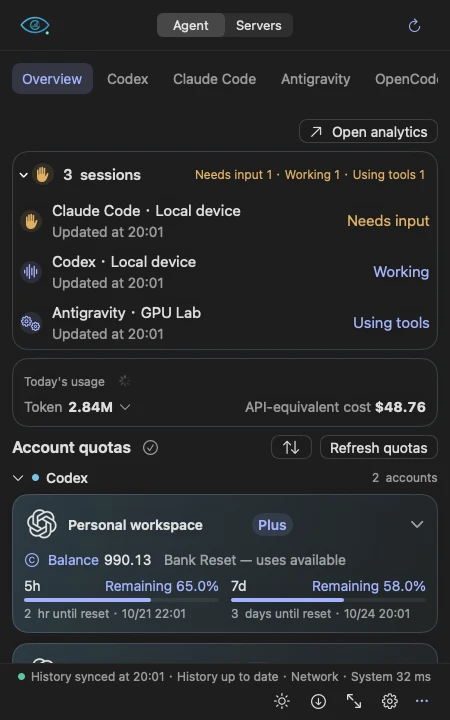
Keep an eye on account quotas, reset windows, credits and today’s usage. Open the compact panel for a quick check, then return to what you were doing.
Quota and balance details depend on the connected provider.
Demo data · English UI preview
02USAGE ANALYTICS
Follow your usage over time. Explore model mix, input and output, cache efficiency and an activity heatmap. Filter by agent, account or machine to find the detail that matters.
API-equivalent cost is an estimate based on model pricing.
Demo data · English UI preview
03AGENTS, ACCOUNTS & APIs
Organize agent accounts and their machines in one place. Connect supported APIs, manage Codex sign-ins and switch between saved Codex accounts or API connections while keeping shared conversation history.
API configuration and account-switching support vary by agent.
Demo data · English UI preview
04SESSIONS & DESKTOP PETS
See when your agents are working, using tools or waiting for you. Let a desktop pet carry that state, or keep things quiet in the menu bar and system tray.
Featured pet: Yuexinmiao by kiffin.
Demo data · English UI preview
05SSH RESOURCE MONITORING
Check Linux servers over SSH alongside your agent activity. Keep CPU, memory, GPU, storage and network readings within reach, with the devices and detail you choose.
Resource monitoring shows current samples; long-term server metrics are not archived.
Demo data · English UI preview
06SCHEDULED WAKEUPS
Schedule small model calls at fixed times on your computer or an SSH Linux host. Review deployment, task status and run results without keeping another terminal open.
Scheduled calls may consume quota. The target device must be available.
Demo data · English UI preview
LESS SETUP. MORE CLARITY.
Download the package for your operating system.
Use the setup guide to select accounts and data sources.
Add an SSH host, choose your panel and pick a desktop pet.
Usage history is stored locally in SQLite. Provider queries and SSH connections use the sources you configure. You choose which agents and machines to connect.
AIEYES / DESKTOP
Choose your platform. The latest release includes installers and checksums.
Latest releaseFAQ
Aieyes works alongside your existing tools. It collects supported usage and session metadata, organizes accounts and APIs, and monitors your configured machines.
It estimates the API value of recorded tokens using model pricing. It is useful for understanding usage; subscription charges and provider invoices are separate.
No. History, quota queries, API setup and session status depend on each agent and provider. For example, Cursor’s private request-level token database is not a supported history source. See the integration documentation for details.
These previews use current interface components, translated presentation copy and synthetic data. They are labeled English UI preview; the app itself currently uses primarily Chinese interface text. Windows images are frontend renders, not recordings of Windows desktop materials.
macOS requires version 14 or later. Current packages use ad-hoc signing on macOS and do not have a Windows publisher certificate, so the operating system may ask you to allow the first launch. See the release notes for installation details.